Thursday, November 08, 2007

Adsense for Mobile

AdSense for mobile allows publishers to generate earnings from their mobile webpages using targeted Google ads. Just like AdSense for content, with AdSense for mobile Google matches ads to the content of your site -- in this case, your mobile website. You'll earn money whenever your mobile website's visitors click on your ads.

f you have a mobile-compliant website that complies with our program policies, you're welcome to participate in AdSense for mobile. Keep in mind that AdSense for mobile is currently available to publishers located in a limited number of locations.

If you're an existing AdSense publisher, you can generate the AdSense for mobile code and get started right away. Just sign in to your account and visit the AdSense Setup tab, then choose AdSense for mobile as the product.

If you don't already have an AdSense account, sign up to get started displaying ads on your mobile website.

Where is AdSense for mobile available?

AdSense for mobile is currently available in the locations listed below. We hope to add additional markets in the future, but do not have a date for when they may become available.

  • Australia
  • China
  • France
  • Germany
  • India
  • Ireland
  • Italy
  • Netherlands
  • Russia
  • Spain
  • United Kingdom
  • United States

What if I don't have a mobile website?

In order to use AdSense for mobile, you must have a mobile-compliant webpage; adding AdSense for mobile ad code to a standard webpage will not display ads.

If you don't currently have a mobile website (and chances are, if you're not sure, then you don't have one), you can create one by rewriting your existing website in a mobile markup language, such as XHTML, WML, or CHTML. You'll also need to make sure the layout of your website is properly formatted to display on mobile phones.

In addition, your mobile website will need to be developed using server-side scripting such as PHP or ASP. Many web hosting providers support PHP, and in many cases, you can PHP-enable your webpages simply by changing the file extension from .htm to .php. Thereafter you can paste the PHP code snippet into the section of the page where you want the AdSense for mobile ads to appear.

Keep in mind that Google will not be able to assist you with creating a mobile website. However, you may be able to find resources on the web that could help you create a mobile site. We suggest doing a Google search for terms such as "create mobile website" or "make mobile webpage".

Once you've created a mobile webpage that complies with our program policies, you're welcome to add Google ads to it!

AdSense for mobile program policies

AdSense for mobile allows publishers to generate earnings from their mobile webpages using targeted Google ads. Just like AdSense for content, with AdSense for mobile Google matches ads to the content of your site -- in this case, your mobile website. You'll earn money whenever your mobile website's visitors click on your ads. AdSense for mobile is available in a limited number of locations.

In addition to our standard program policies, publishers wishing to participate in AdSense for mobile must also comply with the following policies specific to mobile-compliant webpages.

Website Requirements:

Webpages must be mobile-compliant and developed with a server-side scripting language such as PHP; AdSense for mobile ad code will not display ads on standard webpages.

Mobile Webpage Markup Languages:

  • wml (WAP 1.x.)
  • xhtml (WAP 2.0)
  • chtml (imode, etc.)

Ad Placement and Behavior

  • Only one AdSense for mobile ad unit may be displayed per mobile webpage.
  • A "double" ad unit can only be placed on the bottom of the page, but may appear above the page's footer (e.g. navigational links, copyright messages, etc.).
  • Google ads displayed on a publisher's mobile-compliant webpage may not be modified or obscured in any way.
  • After a user click, display of the advertiser's landing page may not be interrupted or prevented in any way. For instance, publishers may not display their own interstitial pages before taking users to the advertiser's website.

Site accessibility

Our crawler must be able to access your mobile webpages to provide relevant ads. For more information, please see our entry on mobile ad targeting.

How do I add the code to my mobile webpage?

To generate your AdSense for mobile ad code, first follow these steps:

  1. Sign in to your account at www.google.com/adsense.
  2. Select the AdSense Setup tab.
  3. Choose AdSense for mobile as your product.
  4. Follow the guided wizard to choose the format of your ad unit, the markup language, colors, and any channels.
  5. From the Server-side scripting language drop-down, choose your scripting language.
  6. Copy the ad code in the Your AdSense code in its entirety.
  7. Paste the code into the source of your mobile webpage in the location where you'd like to appear.

Once you've added the code to your page and saved your changes, relevant ads should appear within 48 hours.
Important thing for Google Adsense Newbie

Your AdSense application has just been approved, and you've got a world of new information to absorb. We've highlighted some key resources to answer all the questions you have about AdSense (but were afraid to ask).

1. First, you can see our handy Quick Start guide to learn how to access your AdSense account and customize your ad code before pasting it into your site. For a more detailed walkthrough, see the Help with Ad Code demo.

2. Once you've added the code to one website, you may want to add it to more of your sites or pages -- the ad code will work for any page or site.

3. Once your ads are up and running, it's time to think about getting paid. The Payment Guide provides a broad overview of AdSense payments, or you can find more in-depth information by watching the Payment demo.

4. If you start to see ads that you'd prefer not to display on your site, don't worry. You can prevent these ads from appearing on your site by using your Competitive Ad Filter list to block them.

5. Are you having trouble with the ads on your site? You can use one of our troubleshooting wizards to sort out the issue, or browse our Help entry on Public Service Ads (PSA's).

6. Familiarize yourself with other AdSense features and products to monetize your site even further: AdSense for search, referrals, and Onsite Advertiser Sign-up that can help you earn more revenue from your site.

7. Concerned about keeping your account in good standing? You can review the program policies for a comprehensive list of do's and dont's or our ten suggestions to help ensure your account won't be disabled.

8. Optimize! Our Optimization Tips will help you earn more and get the most revenue from your AdSense account.

9. Acquaint yourself with the AdSense Help Center. It's the quickest way to get the answers you need at any time.

Now you can get on the road to becoming a successful AdSense publisher...and start driving!

CPM

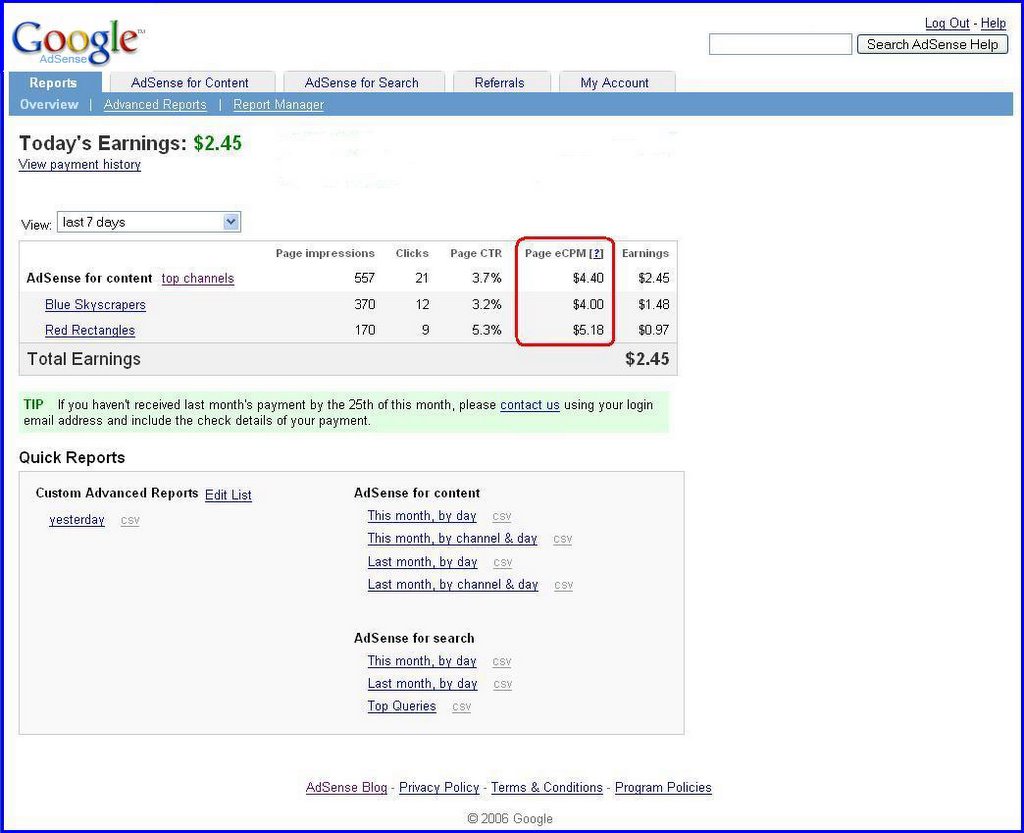
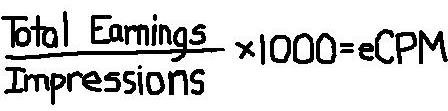
eCPM is a bit of industry shorthand that seems here to stay. You've seen it listed in your AdSense reports; it means, "effective cost per thousand impressions." So how is eCPM calculated, you ask?


eCPM is calculated by dividing total earnings by total number of impressions in thousands. It is a great performance measure for your various ad units, so when experimenting, you can use eCPM to compare your results.


But what if your site doesn't receive enough impressions to have a large sample size? Even for smaller sites, eCPM can be a useful statistic to track ad performance.

For example, let's imagine we have two custom channels named 'Blue Skyscrapers' and 'Red Rectangles', respectively, which reflect the types of ad formats we're testing on our site. During our test, the 'Blue Skyscrapers' channel receives 370 page impressions and $1.48 in total earnings. The 'Red Rectangles' channel receives 187 page impressions and $0.97 in earnings over the same period. To make these figures more comparable we calculate eCPM -- i.e., the estimated earnings for every 1,000 impressions received. We find that eCPM for blue skyscrapers is $4.00 while the eCPM for red rectangles is $5.18.

This means if we received 1,000 impressions of blue skyscrapers, we would earn roughly $4.00. But for 1,000 impressions of red rectangles, we would earn about $5.18. Therefore, assuming that our sample size is large enough, it is to our advantage to switch to red rectangles throughout our site because they generate more revenue per impression.

Your Question about earning

Is there is a minimum number of impressions or clicks I need to get before I can start earning through AdSense?

No, there's no minimum number of impressions or clicks for generating earnings. You can start earning the very first time a user clicks on a cost-per-click (CPC) ad or views a cost-per-thousand-impressions (CPM) ad. Keep in mind, however, that you'll need to earn $100 before your earnings will be paid out to you.

If a CPM ad appears on my site, do I need to receive 1,000 impressions before I am paid?

No, with CPM ads you're paid for each impression, so if you receive 1 ad impression, you'll receive 1/1,000 of the CPM bid for that ad unit.

I received 57 page impressions. Why don't I have any earnings?

It sounds like the ads currently appearing on your site are probably CPC ads, so you'll be paid for clicks, rather than impressions. Our system will automatically display whichever ad or ads representing the highest revenue potential for you, whether they're CPC or CPM ads.

How much do you pay per click or impression?

We don't pay a fixed price for each click or impression - we pay you a portion of the amount paid by the AdWords advertiser. This amount varies based on the actual CPC or CPM paid by the advertiser. Each ad that appears on your site will most likely generate a different CPC or CPM.

Do I get paid when visitors use my search box?

With AdSense for search, you'll be paid when users click on the ads that appear on their search results pages, not from the search queries themselves. You won't be paid if a visitor uses your search box, but chooses not to click on the ads on the search results pages.

Do I get paid when visitors click on my link unit topics?

When a user clicks on a link unit topic, you'll be paid for clicks on the CPC ads that appear on the resulting page of highly targeted ads. However, you won't be paid for clicks on the initial topics themselves. Link units can siginficantly boost your overall AdSense revenue by providing even more relevant and monetized content to your users.

Before you apply to adsense

Getting started with AdSense is easy, but when reviewing the applications we get, we've noticed a few common pitfalls. To help make sure your application is approved the first time around, ask yourself the following questions below before submitting.

Do I have what I need to apply?
  • Website: To display Google ads, you need administrative access to the site you submit for AdSense in order to place our JavaScript ad code on your site. Adding the Google code to your site's source code will enable you to show ads, search boxes, and referral units on your pages.

    If you don't have a website of your own, that doesn't mean you can't participate in AdSense. We offer a couple of options to help you easily create your own site.

    First, there's Blogger, a free tool for setting up and publishing your own blog online. With its easy-to-use and customizable templates, you can create an account and start blogging right away. You can also set up AdSense ads easily through your Blogger account.

    If you prefer more flexibility and control, then our web page tool, Page Creator, may be more suitable. Signing up for a Page Creator account is free as well -- all you need is a Gmail account. The best part is that you don't have to download any software or hire a designer. Once you've created your Page Creator site, you can begin displaying Google ads in minutes.

  • Valid payee name: Payments will be made out to the name on your account, so make sure to include your full and valid name, or that of your business, rather than just initials. If banks won't accept the name you enter in the 'Payee Name' field, neither will we.

  • Valid address: We want to make sure your hard-earned money reaches you, so please also provide a complete valid address where you can receive mail. If you live in a country or territory that doesn't have a standard format for addresses, please be sure that your application includes as much information as a mailman would need to find your residence.
Does my website meet all the necessary requirements?
  • Valid URL: If you manage an entire website, give us the URL of your home page. If you manage a blog or other account within a larger website, you should provide the URL of the specific page that you manage and not the URL of the entire hosting website. Don't forget to double check your URL for typos!

  • Fully launched website: Since we won't be able to review websites that are not fully launched or built, please ensure that your site is live and functioning at the time you submit your application.

  • Unique content: We want visitors to sites in the AdSense network to have a good experience, so please publish content that's interesting and unique. Avoid using "doorway" pages created just for search engines, or other cookie cutter approaches such as affiliate programs with little or no original content. If you're participating in an affiliate program, give people a reason to visit your site first.

  • Supported language: We're constantly working to provide targeted, relevant ads in more languages. However, until then, we can only approve your application if the majority of your website is in one of our supported languages.

  • Pay-To Sites: If your site participates in programs that compensate people to perform activities that drive traffic to you, we can't approve your application. Some examples of these "pay-to" programs are sites that encourage users "to click" or "to surf" or "to read email." In addition, you shouldn't encourage others to join these programs in the content, links, or third-party ads on your site.
We also encourage you to read our program policies in detail for further insight on how to create a successful application. Now that you have all the necessary information, now's a good time to apply.

Find other topic

Standard Guestbook
Name: **
What is your email? **
Your homepage:
Where are you from?
Comments? **
This message is private