Showing posts with label Google Adsense. Show all posts

Sunday, June 21, 2009

Google Analytics Account


For the past few months, more and more Analytics users have been invited to integrate their Analytics and AdSense accounts. Today that feature has become available to everyone. That means if you have an AdSense account, it's time to get it linked! Here's how:

Linking your Analytics and AdSense Accounts

1. Log in to AdSense
2. Click the link that says "Integrate your AdSense account with Google Analytics" on the Reports > Overview tab
3. Follow the on-screen instructions

You'll also notice that other sections of your Analytics account will show a new "AdSense Revenue" tab. You'll be able to compare how much of your AdSense revenue is coming from new visitors versus existing ones, and view revenue based on user language.

Enjoy your new data, and be sure to visit the Help Center if you have other questions about linking your accounts or reviewing your reports.

Adsense Payment


Payments Guide

Are you wondering when your AdSense payment will arrive? Trying to figure out whether you'll be paid this month, or next month? We've put together this guide to explain our payment process - from the five critical steps to setting up your account, to an overview of the life of a payment, everything you need to know is here.

1. 5 Steps to Getting Paid
2. Tracking Earnings
3. Payment Timelines or, "When am I paid?"
4. Holding Payments

5 Steps to getting paid

You must complete all the steps below to get your account set for your first AdSense payment. Keep in mind that your earnings will need to reach the appropriate thresholds before you can provide your tax details, select a payment method, and enter your PIN or phone verification number.

1. Check your address

Since payments and Personal Identification Numbers, which we'll describe below, are sent to the mailing address in your account, it's important to confirm the accuracy of your payment address and payee name. Keep in mind, especially, that checks and Western Union payments are made out to the payee name exactly as entered in your account.

If you need to correct any information, follow the instructions in our Help Center.

2. Provide your tax information

Depending on your location, we may be required to collect tax-related information from you. If you're required to provide tax information, you can do so on the Tax Information page, under the My Account tab. Our interface will help guide you to the appropriate forms and requirements for your particular situation.

Go to your Tax Information page now

3. Select your payment method

Depending on your payment address, there may be a number of payment options available to you, including checks, Electronic Funds Transfer, and Western Union Quick Cash. The easiest way to find out your payment options is to visit your Account Settings page and click the Payment Information [edit] link.

If you're already an approved publisher, choose your payment method now

4. Enter your PIN and phone verification number

When your earnings reach the verification threshold, we'll mail a Personal Identification Number to the payment address in your account. You'll need to enter this PIN into your account before we can send any payments to you. Your PIN will be sent by standard post and will take 2-3 weeks to arrive.

Depending on your location, you may also be asked to verify your phone number. As part of this process, our system will call you at a pre-arranged time, and you'll be required to dial in a verification number that appears in your AdSense account.

5. Reach the payment threshold in earnings

When your total unpaid earnings reach the payment threshold, we'll send you a payment at the end of the next month. This threshold varies depending on the reporting currency in your account.

Let's say, for example, that the payment threshold for your account is US$100. In this case, if your total unpaid earnings reached $100 during January and you completed the 4 steps above, we would send you a payment at the end of February.

If your total unpaid earnings haven't yet reached the payment threshold, they'll roll over to the next month and accrue until they meet the threshold.

Payments are sent within approximately 30 days of the end of the month. See the timeline of our payment cycle in the Payment Timelines section below.

Tracking Earnings

You can track your AdSense performance and earnings from the Reports tab of your account. The Reports tab includes two important sub-tabs: Overview and Advanced Reports, which will display day-to-day details about how much you're earning from AdSense. There's also important information included in the Payment History page, which is linked from the Overview as well as the My Account tab.

The Payment History page tracks the status of previously issued payments, as well as monthly account calculations. You can click the Earnings details link for any month to view your total earnings, as well as any adjustments made to your account. Once you've qualified for a payment, and your payment has been made, you'll see it listed on this page as Payment issued. Click on the link to see the payment details as well as the exchange rate used to calculate your local currency payment, if applicable.

Back to top
Payment Timelines or, "When am I paid?"

One of the most common questions we receive at AdSense support is, "when am I paid?" It's certainly an appropriate question, since you probably joined AdSense to earn money and not just because you like how pretty our ads are. So this section describes how the AdSense payment cycle operates throughout the month, to give you a good idea of when and how your payment will arrive.

Earnings calculated: On the last day of each month, our system identifies all accounts that have reached the payment threshold. All the accounts that have reached the threshold are then sent for approval. Within the first few days of the month, a link with specific earnings details will be posted to your Payment History page within the first few days of the month.

Payment issued: Within the next few weeks, a Payment issued line will be posted to your Payment History page, indicating your payment has been calculated. At this time, we'll have your payment processed and sent to you.

Payment arrives: The time it takes for your payment to arrive depends on form of payment you have selected.

* Standard delivery checks: generally arrive within 1-2 weeks of the mailing date in the U.S.; outside of the U.S. typically arrive in 2-3 weeks.
* Secure Delivery checks: generally arrive in 5-7 days.
* EFT payments: should arrive in your bank account within 2-4 days.
* Western Union Quick Cash payments: available for pick-up at a local agent the following day.
* Rapida payments: available for pickup at your local post branch two business days after they are sent.

If there are any problems with your payment, a notice will be posted on your Payment History page. If you haven't received your payment by the 25th of the next month, you can request a reissue.

Holding Payments

If you'd prefer not to receive payments for a while, we're happy to hold payments for you. Just set up a payment self-hold in your account.

Setting a hold will stop payments and your account will continue to accrue earnings. After you remove your hold, we'll send you a single consolidated payment for all your unpaid earnings. To set or remove a hold, follow these instructions.

Please note that all changes to your hold preferences should be made by the 15th of the month. Changes made to these settings after the 15th of the month may apply to either the current or next payment cycle.

Saturday, May 09, 2009

Adsense Optimized Wordpress Themes to Maximize your Contextual Ad Earnings

I wanted a Wordpress theme with distinct ad blocks so I can easily blend contextual or other types of affiliate ads alongside my main content.

As you probably know, effective ad placement is critical if you plan to make any significant amounts of money through Google Adsense or other contextual ad systems.

Using a blog template with distinct ad blocks and optimized ad placements will very likely help you increase your Click through rates and affiliate conversions. These customized blog designs are also known as Adsense Ready themes.
How are Adsense Ready Themes different from other blog templates?

A key element that is central to all Adsense Ready themes is their focus on integrating contextual ads around content. As you will notice, the ads and link units are carefully placed above, beside and below each individual post to maximize exposure and their click through potential.

Several themes will also allow you to easily place blocks of square ads within each post, which is one of the proven ways to receive the highest amount of ad clicks from the average blog visitor.

Here are some general characteristics of most Adsense Optimized themes:

* Built in Adsense blocks for easy ad insertion.

* Ads are active once the Adsense Publisher ID is inserted or changed

* Optimized Ad placement, colors and types according to Google’s guidelines

* Adsense linkunits and search are already included.

* Search Engine Friendly. Post and category titles are used for page titles etc.

Why should I use Adsense Ready Templates?

The main reason why you should use an Adsense ready theme is convenience. You don’t have to sift through too much code and there’s no need to make major adjustments to the template’s form.

In many instances, all you need is to insert your Adsense publisher ID and you’re done. This will probably only take a few minutes, which can be a huge time and effort saver.

You can probably hack any other Wordpress template to include ads but they can be a hassle if you are unfamiliar with how to optimize your ad placement. Most of these templates are not terribly attractive but I think they are functional and their ad placement is pretty decent.

I think Adsense Ready templates are very useful when you own dozens or hundreds of niche websites which use credited feeds or free content. Niche websites with high paying keywords will be naturally more profitable when you use templates with optimized ad placements.

Dosh Dosh’s List of 18 Adsense Optimized Wordpress Themes

As far as I know, this collection of Adsense Ready themes is the largest online. I’ve included a link to each theme’s home page and as well as a direct download link for your convenience.

Some of the screen shots were taken from the websites referenced and others were screen grabs of blogs running the specific theme. If you know of any other Adsense themes I’ve missed, leave a comment and I’ll add it to the list.

All of the themes should be compatible with Wordpress 2.0+. Feel free to check the theme’s homepage for more information on compatibility and installation.

Recommendations:

All of the themes are pretty similar in function, but I’ve had particularly high click-through rates and ad earnings with several of them and so I’ll like to highly recommend ProSense (#1) and BlueSense (#2).

This post will be updated often and I suggest that you subscribe to my blog feed in order to receive free notifications when new themes are added.

Adsense on twitter

Adding your AdSense code to HootSuite doesn't place ads on your Twitter profile page.

Ads are displayed on any links you tweet out that have been shortened via the ow.ly URL shortener.

Try this:

1) On Google AdSense, create a new ad that is a 234x60 half-banner.

2) In HootSuite, click on Settings and paste the AdSense code. Then choose which Twitter profiles you'd like to display ads for.

3) In HootSuite, create a new tweet. Add a link to this tweet by entering in a URL and clicking "Shrink it!" -- the URL will be shortened via the ow.ly URL shortener.

4) When you send the tweet, any users who click on the ow.ly link will be shown an AdSense ad in the top banner. With each click, there's a 50% chance it will show your AdSense code, and a 50% chance it will show HootSuite's AdSense ads.

5) Send out more tweets and start monetizing your links!

When you send a tweet with an ow.ly URL, you can also track clickthrough stats in HootSuite -- check out the "Stats" page.

If you choose not to show any AdSense ads for a Twitter profile, no ads will be displayed on ow.ly links sent out from that profile.

Adsense on facebook

Is Google-the-Goliath sneaking into the Facebook building — via the basement?

Google is actively recruiting third-party developers with applications on Facebook to run Adsense ads within applications pages, VentureBeat has learned.

These aren’t just any old Adsense ads, according to our sources — developers have been inserting plain-vanilla Adsense into Facebook applications since the developer platform launched in May. Now, Google is specifically building this network for advertisers who want to be on Facebook, and will let advertisers run their ads across all Facebook apps that sign up for it.

Facebook has been clear about letting third-party developers sell ads on their own “canvas” pages on the site and keep all the revenue — a loophole that the Google seems to fit through just fine. See sample screenshots of what the Google ads will look like, taken here from Fantasy Stock Exchange and South Park Character Creator (and no, I don’t regularly use either app):

fantasy-stock-exchange-1.png

south-park-characters-1.png

Microsoft has already inked an exclusive deal with Facebook to sell ads on Facebook pages within the US. By selling ads on third-party applications, Google is doing an end-run around this deal.

When it comes to Facebook and social networking, Google is apparently firing on all fronts.

Building relationships with Facebook advertisers also allows Google to test how to successfully monetize third party applications before it introduces its own developer platform. Google is apparently set to make an announcement on November 5 that it will give third party developers access to user data in Orkut, its own social network which is popular in Brazil and India but not in most other countries. To this end, it is also actively recruiting third-party developers on Facebook to develop on Orkut, we are told.

Google is also rumored to be in a three-way competition with Microsoft and Yahoo to sell ads on Facebook’s own pages outside of the US. Like its two competitors, it is also rumored to be trying to buy a chunk of Facebook.

So far, only third-party startups that have launched ad networks for applications on Facebook, including those run by RockYou, VideoEgg, Social Media, Lookery and others. Some of these networks sell contextual text and video ads within an application’s pages. Some even sell ads on popular Facebook applications for less popular applications, so the latter group can try to convince Facebook users to add their application as well. Also of note: We’ve also been hearing rumors that Facebook is working on its own ad network for applications within Facebook.

Whether anyone can make big bucks from third-party applications is another question. We’re hearing from developers that all of these ad networks work about the same. We’re hearing some — those with 50,000 active users or more - are even getting enough to pay for their servers, room and board. That’s enough to avoid taking on funding while you work out your long-term business strategy.

Google has responded with the usual “no comment.”

Thursday, April 09, 2009

Ad Review Center available to all publishers

Many of you have been eagerly waiting for the Ad Review Center to arrive in your accounts, and we're happy to tell you that this feature is now available for all publishers. By enabling you to review all ads placement-targeted to your site, the Ad Review Center gives you more transparency and control, and ensures that ads are relevant to your site's content and users.

We wanted to share a publisher's thoughts about the Ad Review Center, so we chatted with Jennifer McDonald, Account Manager at RealNetworks for sites such as rollingstone.com and film.com. Before using it, Jennifer says that "the concerns Real had... were mainly concerns about running competitive ads on our sites." But she says that by using the Ad Review Center, her team has been able to keep competitive ads from running. As she notes, "We are able to quickly review the ads before they run on our sites and block any ads that are considered competitive to our services."

The Ad Review Center is now available for all publishers utilizing placement targeting. You can get started with this feature by visiting your 'Competitive Ad Filter' page, located under the 'AdSense Setup' tab.

Before getting started, we strongly recommend keeping your review preference set to the default of 'Run ads immediately.' This will let you allow or block ads after they have run. If you choose the other option of 'Hold ads,' the ads will await review for 24 hours before being allowed to run automatically. Using the 'Hold ads' setting will keep ads from participating in the auction while they await review, potentially lowering winning bids and your AdSense earnings. Ads that you have blocked can't compete in the auction either, so we ask that you keep in mind the revenue impact of blocking ads or switching from the 'Run ads immediately' setting.

For more information about using the Ad Review Center, please visit our Help Center, and to start using it, please log in to your account.

Earning revenue from youtube videos just got easier

We'd like to let you know about two recent improvements to video units that make them more easy and appealing to place on your sites. First, we've partnered with some new content providers that we'd like to highlight. These partners have signed on to let AdSense publishers embed their videos and share in the ad revenue.
  • Broadbandtv: "Broadbandtv is partnering with YouTube to bring the very best video program lineup to a growing and engaged online audience. Broadbandtv shows include hits from Fashion, Celebrity News, Sports, Technology, Comedy and Travel to top notch Spanish-language TV series like Somos Tu y Yo."
  • Canadian Broadcasting Corporation: "CBC/Radio-Canada is Canada's national public broadcaster and one of its largest cultural institutions. CBC/Radio-Canada is available how, where, and when Canadians want it."
  • The Orchard: "A global leader in digital music, video, new media and brand services, The Orchard offers family content like Gumby, Mr. Bill, My Favorite Martian, and other categories of content like music and comedy."
To give you a better idea of the videos that are available for syndication to your site, we've also created a gallery of some featured video units content partners. Note that to choose any of these content providers for your video unit, you should get their YouTube username by visiting their YouTube channel, and then put this username into the "Channel" field when choosing content for your unit.

Second, we're happy to announce that video units now support 728x90 and 160x600 formats to more easily fit into your site. These two new formats will feature five video thumbnails - when a user clicks on one of the thumbnails, a full sized video unit will appear, along with accompanying ads:

728x90 video unit


728x90 video unit, expanded


160x600 video unit, expanded


You'll generate earnings for valid clicks or impressions on the ads which appear. To use the new formats, you'll need to create new video units by visiting your AdSense Setup tab. To choose the new content for your video units, you can edit any of your players or set up new video units dedicated to this new content. Please keep in mind that video units are currently only supported for English or Japanese-language accounts in the following regions:
Australia, Canada, France, Ireland, Italy, Japan, Netherlands, New Zealand, Poland, Spain, United Kingdom, United States
Finally, if you haven't edited or made a new video unit recently, you may not have noticed that you can now preview the kinds of video that will show up in the unit, based on the filtering choices you've made. We heard that you wanted more insight into the types of content that would display, and we think this will help.

While you can use video units like any other ad, they're also a great addition to the content of your page. So we encourage you to use video units as you may have used embedded YouTube videos in the past - to add variety and interest for your users.

Make a date with data in Google Analytics

Here in AdSense, we’re big on data. From spreadsheets and graphs to weekly reports and metrics, we constantly turn to numbers when running our business. In a similar vein, we've heard your requests for more data to help you run your AdSense websites, which is why we’re excited to announce the integration of one of our personal favorite reporting tools, Google Analytics, with AdSense. We're gradually rolling out this functionality to publishers, and you'll see an invitation link at the top of your 'Overview' and 'Advanced Reports' pages when it's been enabled for your account.


By integrating your AdSense account with a new or existing Analytics account, you’ll have access to in-depth reports about user activity on your site. In addition to the wealth of metrics already available in Analytics such as unique visitors and visitor language, you'll now have access to granular reports that break down AdSense performance both by page and by referring site. Armed with this new data about user behavior, you’ll be able to make more informed decisions on how to improve the user experience on your site and optimize your AdSense units to increase your revenue potential.


We've highlighted a few ways to use the integrated metrics below, but we encourage you to be creative! Come up with your own to discover how useful (and fun) new data can be:
  • Discover untapped markets. Use the geographies report to determine which regions are under-represented in your site’s user base. Optimize your site’s content to attract more of these under-represented users.
  • Drive high-earning traffic to your site. Use the 'Referring sites' report to determine where the users who are making you the most money are coming from. Focus your efforts on getting traffic from these sources.
  • Delve deeper into AdSense reports. Use the visualization feature to look at trends in your site's AdSense performance over time, or by time of day.
Again, this feature is not yet available to all our publishers, but please keep checking your account for an invitation. In the meantime, you can take a look at our demo to learn more about the reports you'll have access to:


Wednesday, October 22, 2008 at 11:04:00 AM

Maximizing revenue by exposing your channels to the right advertisers

As you may know, you can set up your custom channels so that they're targetable by advertisers - these targetable custom channels are known as ad placements. By selecting the 'Allow advertisers to target this channel' checkbox on the channel creation page, you can enable brand advertisers to target their content to your audience directly on a CPM or CPC basis.

Creating ad placements allows them to show up in AdWords, so that advertisers who create placement-targeted campaigns can include your content directly. What many publishers don't know is that this also makes your content available to Google's internal sales teams, who work closely with many advertisers looking to target a certain audience or type of content. With this in mind, we thought it would be important to mention a few best practices which will help advertisers and our internal sales teams target your content to help you maximize revenue:

First, take time to make sure your channel names and descriptions accurately describe your content and audience. By including descriptions that closely reflect your content, you'll also attract advertisers from those areas. Naming and descriptions are important.


On that note, our second tip: be very careful about changing the name of an ad placement. If an advertiser has already targeted one of your specific channels, the channel will become unavailable to the advertiser once you change its name. If you wish to rename a channel, we recommend creating a second channel with the new name, and then attaching both channels to your ad unit. Remember, you can attach up to five custom channels to an ad unit.

Third, use the 300x250 medium rectangle, opted in to both text and image ads. This is one type of targetable ad unit that's in high demand by Google's CPM advertisers. We recommend placing these units in line with your content, and describing them as they relate to the content. This combination of format and placement enables advertisers to use image, text, or rich media (including gadget ads) effectively. In feeds, we recommend opting in to both image and text in all ad units, as many of these advertisers only target with image ads into feeds.

Finally, as always, the most important tip for maximizing revenue from your ad placements is to create quality content that is visually appealing and attracts a quality audience. Many brand advertisers look at all placements before placing an advertising order to make sure the destination sites are in line with their brand and attract the type of audience they wish to target for a particular campaign.

Wednesday, March 04, 2009

Adsense for Domain

The Inside Adsense Blog has just announced that Adsense for Domains is now available to all publishers who owns several domains which are not really live sites. Whereas previously the only way that domain owners can earn from their registered dormant sites was to let third-party publishers to run their ads on those and then earn a miniscule of earnings. But with the Adsense for Domains open to all publishers, everyone can now run Adsense on their dormant domains regardless of whether they own only one or two domains.

By being available to “all publishers”, Google meant only those who are located in the U.S. Google Adsense is yet to roll this out to “all publishers” worldwide.

Although this would not make domain owners ultra-rich with revenues, it is however a better deal than letting other advertisers not connected with Adsense run their ads on those domains. This is for the simple reason that Adsense assumingly pays better.

If you opt to join Adsense for Domains, which you can do so by visiting your Adsense account, Google will run ads, links and search results on the dormant domains and will add more useful information in the near future.

This is a good way of making use of domains we bought but we haven’t really had the time to develop. Instead of paying them for nothing and hoping someday that somebody would buy it a high price, might as well run Adsense for Domain there.

Friday, February 20, 2009

Celebrity adsense

I have never been much satisfied with Adsense for celebrity sites anyways. Since last 5-6 months Google Adsense has been paying a cent or two for every click i get on my celebrity sites network. Believe me, i have lot of traffic on those sites and i really do get lot of clicks there. An average 100 clicks give me $2.00 only. I mean, this really is insane. Isn’t it? Is that what the advertisers at adwords are really paying for celebrity sites? I feel totally looted here!

Anyways, recently i was browsing my Adsense account and there in those green highlighted pointers it was written that verifying your website via Google Webmaster Tools will help us serve you better. Well, i thought this is it. Much targeted ads, much more money and much better revenue for the celebrity sites. So i readily added and verified all my celebrity websites. So what do you think? Problem solved? Am i earning more now?

Lol :lol: Not really. It’s even worse! Now an average 100 clicks give me $0.50 to $0.75. There you are Google Adsense. You really are brilliant with getting much more targeted ads.

My Dear God. Who in the world pays less than 1 cent per click to any advertiser program in the whole wide world?

I checked the ads running on my sites. Just reading the url and opening them in new windows. Each and every site is Made for Adsense (MFA). And they look worse. With absolutely no content. For God sake even blogspot blogs are being advertised by Adsense! Where is the Google TOS of “good landing page” being applied? I just want to ask, why is Google so dumb with their advertisers? And yet they come out brave and merciless when it comes to paid advertising on other sites which we have, by deindexing and banning and PR ripping things. What is it with you Google? Why don’t you get a life? Why can’t you live your own life and let live others their own?

Fact is, Google won’t let you sell advertising on your sites and blah blah blah, because they want people to use Adsense instead. But hey, they will not let you earn with Adsense either. Because they can’t filter MFA’s from their advertiser program. :(

So there you have it. Google Adsense vs. Celebrity Sites. You clearly know who the winner is! Don’t ruin your life. Get some better publisher advertisement programs on your celebrity sites.

Saturday, July 05, 2008

We are retiring AdSense Referrals

Thank you for participating in the AdSense Referrals program.
We’re writing to let you know that we will be retiring the AdSense
Referrals program during the last week of August. We appreciate
your patience during this transition and here are some alternative
options to consider:

* Google Affiliate Network: As part of the integration of
DoubleClick, the DoubleClick Performics Affiliate Network will now
operate as the Google Affiliate Network for advertisers targeting
users located in the United States. Similar to the AdSense
Referrals program, the Google Affiliate Network enables publishers
to apply for advertiser programs and get paid based on
advertiser-defined actions instead of clicks or impressions. For
further details, please visit:
www.google.com/ads/affiliatenetwork.
* AdSense for content ads: If you have less than three AdSense
for content ad units on a page, you may wish to replace the
referral ad units with standard AFC ad units.


If you currently use referral ads, either to promote Google
products or offerings from AdWords advertisers, AdSense Referrals
code will no longer display ads beginning the last week of August.
We encourage you to take the following steps before the product is
retired:

* Remove the referral code from your site(s): Please take a
moment to remove all referral code from your sites before the last
week of August, so you can continue to effectively monetize your
ad space.
* Run and save all referrals reports on your desktop: Create
and save all reports related to the referrals program on your
desktop, so you continue to have access to your valuable campaign
information


Why is this happening?
We're constantly looking for ways to improve AdSense by developing
and supporting features which drive the best monetization results
for our publishers. Sometimes, this requires retiring existing
features so we can focus our efforts on the ones that will be most
effective in the long term. For this reason, we will be retiring
the AdSense Referrals program. If you have any additional
questions, please visit our Help Center:

Friday, June 06, 2008

Third-party ads now available on the Google content network

We're happy to announce that the Google content network now
accepts display ads served from qualified third-party vendors.
During this initial release, only ads in English are eligible,
although we look forward to offering more options in the future.

By accepting third-party ads, we can attract a greater variety of
advertising on the Google content network, which we believe will
result over time in increased revenue for publishers and more
relevant advertising for end users.

If you're currently opted in to image ads, you're already able to
receive third-party ads. If not, you can enable image ads to start
receiving third-party ads immediately. (Learn how to enable image
ads at
https://www.google.com/adsense/support/bin/answer.py?answer=9741.)

If you choose to allow third-party ads on your site, please update
your privacy policy to inform your visitors that third-party
vendors may serve ads on your site. Please also provide links to
these vendor websites and inform your users that they may opt out
of cookies (if the vendor offers this capability). For more
information about updating your policies, visit
https://www.google.com/adsense/support/bin/answer.py?answer=94150.

You'll continue to have full control over which ads appear on your
site with tools like competitive ad filtering and the Ad Review
Center. Also, only advertisers with whom we have proven
relationships and who've clearly demonstrated commitments to our
quality standards may participate in this program. Our policies
governing ad content and formatting remain unchanged.

To learn more about third-party ads, please visit our blog post at
http://adsense.blogspot.com/2008/05/introducing-third-party-ads-on-google.html
and our FAQ at
https://www.google.com/adsense/support/bin/topic.py?topic=14535.

Thursday, March 27, 2008

Goggle Publisher Tools

Drive more traffic to your site
Google Sitemaps
Help people discover more of your web pages with Google webmaster tools
Google's suite of webmaster tools provides you with a free and easy way to make your site more Google-friendly. They can show you Google's view of your site, help you diagnose problems, and let you share info with us to help improve your site's visibility in Google's search results.
Google Analytics
Recognize traffic trends with Google Analytics
Get easy access to intuitive graphs that show exactly what's happening on your site. You can pinpoint exactly which links and pages on your site are popular with your readership and which aren't. Or see exactly where your readers are coming from - which website, country, state and city.
Google AdWords
Drive traffic to your site with Google AdWords
With Google AdWords you create your own ads, choose keywords to help us match your ads to your audience and pay only when someone clicks on them. That is, you only pay when your advertising works.
Google Base
Make it easier for users to find your content with Google Base
Google Base is a place where you can easily submit all types of content, which we'll make searchable on Google properties. You can describe any item you post with attributes, which will help people find if when they do related searches.
Google Coop
Harness the power of Google search to create a free Custom Search Engine
Create a highly specialized search engine that reflects your knowledge and interests. Place it on your website, and using our AdSense for Search program, make money from the resulting traffic.

Add interactivity and community to your site
Video
Enrich your site with Google Video
Explore Google Video and you'll find a wide selection of content that can be displayed on your site, for free. It's fast and easy to upload a video or embed videos on your site to instantly share them with your users.
Blogger
Engage your readers with Blogger
Use a blog to easily update your readers with your news, photos and videos and encourage feedback and interaction through user comments.
Choose from a range of designer templates to get started in minutes.
Google Maps
Integrate Google's interactive maps into your site's data using Google Maps API
Integrate your site's data into Google's interactive maps and embed them in your web pages with JavaScript. You can plot points and lines and display information windows with the Google Maps look and feel. The Google Maps API is a free (beta) service, available for use on any website that is free to consumers.
Google Apps
Enable your users to work together more effectively with Google Apps
Google Apps provides your users with innovative applications to help them become more productive through better communication and collaboration. Give them the tools they need with your own special branding, color scheme and content. Take advantage of Gmail, Google Talk, Google Calendar, Docs & Spreadsheets and Page Creator and have it all hosted by Google without any hardware and software to install or maintain.
Docs & Spreadsheets
Share documents and spreadsheets online with Google Docs & Spreadsheets
You and your colleagues can collaborate in real time, even from different locations, and everyone will always see the most current version. AdSense publishers can use Google Docs & Spreadsheets to create and share site content, edit webpage mockups in HTML or text, or manage marketing plans, contracts, proposals, and budgets.
Groups
Collaborate with your users with Google Groups
Create a customizable group to co-author pages with your users, upload and share files (including photos), form email lists and start discussions.

Monday, March 10, 2008

What does the Link field do?

The Quick Answer

  • The Link field associates a post with another webpage for reference.
  • It's handy for link blogs or blogs that frequently provide critiques or commentary on other sites.

Note: This article assumes you are using a customized classic template. If you are using Layouts or a default classic template, all you will need to do is set the Show Link Field option to Yes to enable the link field.

The Link field can be very useful if your blog posts are frequently about other articles, and you want the links to these easily spotted on your public blog.

To enable the Link field, go to Settings | Formatting and scroll all the way to the bottom, then set Show Link Field to Yes then click the Save button:

Screenshot: Settings | Formatting | Show Link Field

The "posted by" line is usually a good spot for it, but be creative:

Here's what this looks like on the excellent BoingBoing weblog:

BoingBoing Link tag example

Another method is to make your Post Titles links, like on Ev's blog:

Thursday, February 07, 2008

New Ad management in Google Adsense

If you've ever generated ad code in the past, then you'll notice some changes in your account with our latest feature. This new ad management feature allows you to store details about an AdSense unit, including ad size, colors, and channel settings, on our servers. By keeping these details on our servers rather than in the ad code on your pages, you can make changes to the AdSense units on your pages from within your account.

Read on below for more details about the new ad management feature and how it will impact you.

What's different about the way I create ads?

We now offer the option to create new AdSense units which you can customize and update within your account to see changes directly on your site. When you create a new AdSense unit, details of the ad unit (like colors and channels) will be stored in your AdSense account. This gives you faster, simpler ad management, allowing you to make changes to an AdSense unit on-the-fly without needing to re-paste the ad code or make additional changes to the page itself.

Please note that the option to manage ads from within your account is only available for your AdSense for content and referral units at this time.

How do I create an AdSense unit?

To create a new AdSense unit that you can manage within your account, follow the steps below. (The first few will seem pretty familiar to those of you who have generated code before.)

  1. Sign in to your account at http://www.google.com/adsense.
  2. Under the AdSense Setup tab, choose the Get Ads link.
  3. Select AdSense for content as the product. The new AdSense units are only available for AdSense for content at this time.
  4. Choose your ad type, format, colors, and channels just as you have in the past.
  5. Give your AdSense unit a name that you can remember. We recommend including the site(s), page(s), or location(s) that the AdSense unit will be placed on, so you can easily identify it in the future should you wish to make updates.
  6. Click Submit and Get Code.
  7. Copy and paste the newly generated code onto your site.

How do I manage my existing AdSense units?

To manage an AdSense unit you've already created, simply take the following steps:

  1. Sign in to your account at http://www.google.com/adsense.
  2. Under the AdSense Setup tab, visit the Manage Ads page.
  3. On this page, you'll see a list of active AdSense units -- units that have been created or received impressions in the last 7 days. (You can view a full list by selecting the checkbox next to 'Show inactive AdSense units'.) Select the AdSense unit you want to update.
  4. Change the settings for this unit, then use the preview to view the changes. Save your changes.

Once you've saved your changes, they'll be visible in this AdSense unit on every page which contains the code for this AdSense unit. Keep in mind that it typically takes about 10 minutes for all our servers to be informed of the change and reflect it on your pages.

What if I already have an ad unit that I like? Do I have to go through that whole setup again?

If you have existing ad units you'd like to keep using, you don't need to go through the entire process of selecting ad settings and colors again. Instead, you can easily upgrade your ad code within your account using our import code option.

  1. Find and copy the code on your site that you'd like to update.
  2. Sign in to your AdSense account and visit the AdSense Setup tab.
  3. On the Manage Ads page below it, you'll see the option to Import your old AdSense code. Click this link.
  4. On the resulting page, paste your existing ad code into the box and give it a memorable name (we suggest including the site, page, location and/or appearance in the name).
  5. Click Save and get code to create a new AdSense unit with the exact same settings.
  6. Replace the old code your pages with the newly generated code and save your pages.

In the future, you'll be able to make changes to this AdSense unit from within your account, without updating your pages.

Do I have to use the new ad management feature, or can I stick with my old ad units?

While we expect the improved ad management options to be an upgrade for most publishers, you're also welcome not to use these options. Ads you've created in the past using the old version of the code will continue to work fine. However, keep in mind that we no longer provide the option to generate the old version of the ad code.

Going forward, when you generate code for a new ad unit, you'll be required to name it just in case you ever wish to update it in the future. If you'd prefer not to make updates to your ad units from within your account, that's fine. You can create a new ad unit every time you want to make changes to your ads.

Thursday, November 08, 2007

Adsense for Mobile

AdSense for mobile allows publishers to generate earnings from their mobile webpages using targeted Google ads. Just like AdSense for content, with AdSense for mobile Google matches ads to the content of your site -- in this case, your mobile website. You'll earn money whenever your mobile website's visitors click on your ads.

f you have a mobile-compliant website that complies with our program policies, you're welcome to participate in AdSense for mobile. Keep in mind that AdSense for mobile is currently available to publishers located in a limited number of locations.

If you're an existing AdSense publisher, you can generate the AdSense for mobile code and get started right away. Just sign in to your account and visit the AdSense Setup tab, then choose AdSense for mobile as the product.

If you don't already have an AdSense account, sign up to get started displaying ads on your mobile website.

Where is AdSense for mobile available?

AdSense for mobile is currently available in the locations listed below. We hope to add additional markets in the future, but do not have a date for when they may become available.

  • Australia
  • China
  • France
  • Germany
  • India
  • Ireland
  • Italy
  • Netherlands
  • Russia
  • Spain
  • United Kingdom
  • United States

What if I don't have a mobile website?

In order to use AdSense for mobile, you must have a mobile-compliant webpage; adding AdSense for mobile ad code to a standard webpage will not display ads.

If you don't currently have a mobile website (and chances are, if you're not sure, then you don't have one), you can create one by rewriting your existing website in a mobile markup language, such as XHTML, WML, or CHTML. You'll also need to make sure the layout of your website is properly formatted to display on mobile phones.

In addition, your mobile website will need to be developed using server-side scripting such as PHP or ASP. Many web hosting providers support PHP, and in many cases, you can PHP-enable your webpages simply by changing the file extension from .htm to .php. Thereafter you can paste the PHP code snippet into the section of the page where you want the AdSense for mobile ads to appear.

Keep in mind that Google will not be able to assist you with creating a mobile website. However, you may be able to find resources on the web that could help you create a mobile site. We suggest doing a Google search for terms such as "create mobile website" or "make mobile webpage".

Once you've created a mobile webpage that complies with our program policies, you're welcome to add Google ads to it!

AdSense for mobile program policies

AdSense for mobile allows publishers to generate earnings from their mobile webpages using targeted Google ads. Just like AdSense for content, with AdSense for mobile Google matches ads to the content of your site -- in this case, your mobile website. You'll earn money whenever your mobile website's visitors click on your ads. AdSense for mobile is available in a limited number of locations.

In addition to our standard program policies, publishers wishing to participate in AdSense for mobile must also comply with the following policies specific to mobile-compliant webpages.

Website Requirements:

Webpages must be mobile-compliant and developed with a server-side scripting language such as PHP; AdSense for mobile ad code will not display ads on standard webpages.

Mobile Webpage Markup Languages:

  • wml (WAP 1.x.)
  • xhtml (WAP 2.0)
  • chtml (imode, etc.)

Ad Placement and Behavior

  • Only one AdSense for mobile ad unit may be displayed per mobile webpage.
  • A "double" ad unit can only be placed on the bottom of the page, but may appear above the page's footer (e.g. navigational links, copyright messages, etc.).
  • Google ads displayed on a publisher's mobile-compliant webpage may not be modified or obscured in any way.
  • After a user click, display of the advertiser's landing page may not be interrupted or prevented in any way. For instance, publishers may not display their own interstitial pages before taking users to the advertiser's website.

Site accessibility

Our crawler must be able to access your mobile webpages to provide relevant ads. For more information, please see our entry on mobile ad targeting.

How do I add the code to my mobile webpage?

To generate your AdSense for mobile ad code, first follow these steps:

  1. Sign in to your account at www.google.com/adsense.
  2. Select the AdSense Setup tab.
  3. Choose AdSense for mobile as your product.
  4. Follow the guided wizard to choose the format of your ad unit, the markup language, colors, and any channels.
  5. From the Server-side scripting language drop-down, choose your scripting language.
  6. Copy the ad code in the Your AdSense code in its entirety.
  7. Paste the code into the source of your mobile webpage in the location where you'd like to appear.

Once you've added the code to your page and saved your changes, relevant ads should appear within 48 hours.


Important thing for Google Adsense Newbie

Your AdSense application has just been approved, and you've got a world of new information to absorb. We've highlighted some key resources to answer all the questions you have about AdSense (but were afraid to ask).

1. First, you can see our handy Quick Start guide to learn how to access your AdSense account and customize your ad code before pasting it into your site. For a more detailed walkthrough, see the Help with Ad Code demo.

2. Once you've added the code to one website, you may want to add it to more of your sites or pages -- the ad code will work for any page or site.

3. Once your ads are up and running, it's time to think about getting paid. The Payment Guide provides a broad overview of AdSense payments, or you can find more in-depth information by watching the Payment demo.

4. If you start to see ads that you'd prefer not to display on your site, don't worry. You can prevent these ads from appearing on your site by using your Competitive Ad Filter list to block them.

5. Are you having trouble with the ads on your site? You can use one of our troubleshooting wizards to sort out the issue, or browse our Help entry on Public Service Ads (PSA's).

6. Familiarize yourself with other AdSense features and products to monetize your site even further: AdSense for search, referrals, and Onsite Advertiser Sign-up that can help you earn more revenue from your site.

7. Concerned about keeping your account in good standing? You can review the program policies for a comprehensive list of do's and dont's or our ten suggestions to help ensure your account won't be disabled.

8. Optimize! Our Optimization Tips will help you earn more and get the most revenue from your AdSense account.

9. Acquaint yourself with the AdSense Help Center. It's the quickest way to get the answers you need at any time.

Now you can get on the road to becoming a successful AdSense publisher...and start driving!

CPM

eCPM is a bit of industry shorthand that seems here to stay. You've seen it listed in your AdSense reports; it means, "effective cost per thousand impressions." So how is eCPM calculated, you ask?


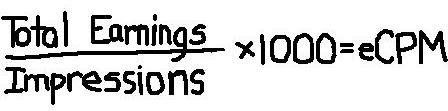
eCPM is calculated by dividing total earnings by total number of impressions in thousands. It is a great performance measure for your various ad units, so when experimenting, you can use eCPM to compare your results.


But what if your site doesn't receive enough impressions to have a large sample size? Even for smaller sites, eCPM can be a useful statistic to track ad performance.

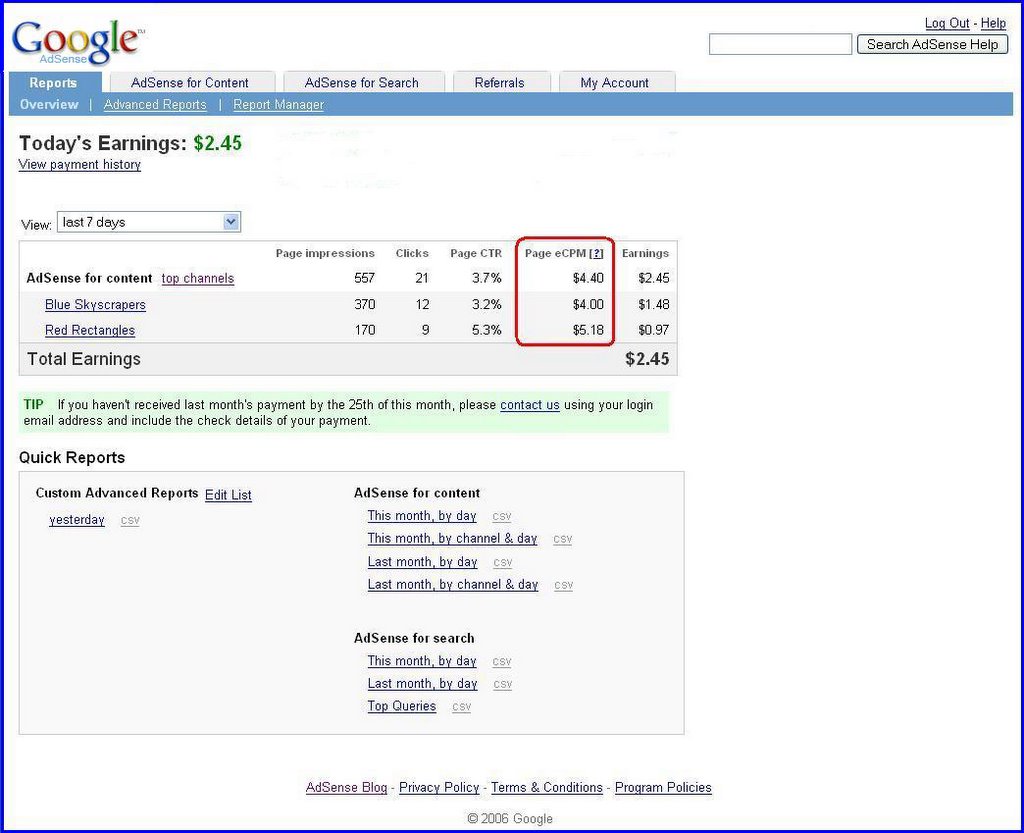
For example, let's imagine we have two custom channels named 'Blue Skyscrapers' and 'Red Rectangles', respectively, which reflect the types of ad formats we're testing on our site. During our test, the 'Blue Skyscrapers' channel receives 370 page impressions and $1.48 in total earnings. The 'Red Rectangles' channel receives 187 page impressions and $0.97 in earnings over the same period. To make these figures more comparable we calculate eCPM -- i.e., the estimated earnings for every 1,000 impressions received. We find that eCPM for blue skyscrapers is $4.00 while the eCPM for red rectangles is $5.18.

This means if we received 1,000 impressions of blue skyscrapers, we would earn roughly $4.00. But for 1,000 impressions of red rectangles, we would earn about $5.18. Therefore, assuming that our sample size is large enough, it is to our advantage to switch to red rectangles throughout our site because they generate more revenue per impression.

Your Question about earning

Is there is a minimum number of impressions or clicks I need to get before I can start earning through AdSense?

No, there's no minimum number of impressions or clicks for generating earnings. You can start earning the very first time a user clicks on a cost-per-click (CPC) ad or views a cost-per-thousand-impressions (CPM) ad. Keep in mind, however, that you'll need to earn $100 before your earnings will be paid out to you.

If a CPM ad appears on my site, do I need to receive 1,000 impressions before I am paid?

No, with CPM ads you're paid for each impression, so if you receive 1 ad impression, you'll receive 1/1,000 of the CPM bid for that ad unit.

I received 57 page impressions. Why don't I have any earnings?

It sounds like the ads currently appearing on your site are probably CPC ads, so you'll be paid for clicks, rather than impressions. Our system will automatically display whichever ad or ads representing the highest revenue potential for you, whether they're CPC or CPM ads.

How much do you pay per click or impression?

We don't pay a fixed price for each click or impression - we pay you a portion of the amount paid by the AdWords advertiser. This amount varies based on the actual CPC or CPM paid by the advertiser. Each ad that appears on your site will most likely generate a different CPC or CPM.

Do I get paid when visitors use my search box?

With AdSense for search, you'll be paid when users click on the ads that appear on their search results pages, not from the search queries themselves. You won't be paid if a visitor uses your search box, but chooses not to click on the ads on the search results pages.

Do I get paid when visitors click on my link unit topics?

When a user clicks on a link unit topic, you'll be paid for clicks on the CPC ads that appear on the resulting page of highly targeted ads. However, you won't be paid for clicks on the initial topics themselves. Link units can siginficantly boost your overall AdSense revenue by providing even more relevant and monetized content to your users.

Before you apply to adsense

Getting started with AdSense is easy, but when reviewing the applications we get, we've noticed a few common pitfalls. To help make sure your application is approved the first time around, ask yourself the following questions below before submitting.

Do I have what I need to apply?
  • Website: To display Google ads, you need administrative access to the site you submit for AdSense in order to place our JavaScript ad code on your site. Adding the Google code to your site's source code will enable you to show ads, search boxes, and referral units on your pages.

    If you don't have a website of your own, that doesn't mean you can't participate in AdSense. We offer a couple of options to help you easily create your own site.

    First, there's Blogger, a free tool for setting up and publishing your own blog online. With its easy-to-use and customizable templates, you can create an account and start blogging right away. You can also set up AdSense ads easily through your Blogger account.

    If you prefer more flexibility and control, then our web page tool, Page Creator, may be more suitable. Signing up for a Page Creator account is free as well -- all you need is a Gmail account. The best part is that you don't have to download any software or hire a designer. Once you've created your Page Creator site, you can begin displaying Google ads in minutes.

  • Valid payee name: Payments will be made out to the name on your account, so make sure to include your full and valid name, or that of your business, rather than just initials. If banks won't accept the name you enter in the 'Payee Name' field, neither will we.

  • Valid address: We want to make sure your hard-earned money reaches you, so please also provide a complete valid address where you can receive mail. If you live in a country or territory that doesn't have a standard format for addresses, please be sure that your application includes as much information as a mailman would need to find your residence.
Does my website meet all the necessary requirements?
  • Valid URL: If you manage an entire website, give us the URL of your home page. If you manage a blog or other account within a larger website, you should provide the URL of the specific page that you manage and not the URL of the entire hosting website. Don't forget to double check your URL for typos!

  • Fully launched website: Since we won't be able to review websites that are not fully launched or built, please ensure that your site is live and functioning at the time you submit your application.

  • Unique content: We want visitors to sites in the AdSense network to have a good experience, so please publish content that's interesting and unique. Avoid using "doorway" pages created just for search engines, or other cookie cutter approaches such as affiliate programs with little or no original content. If you're participating in an affiliate program, give people a reason to visit your site first.

  • Supported language: We're constantly working to provide targeted, relevant ads in more languages. However, until then, we can only approve your application if the majority of your website is in one of our supported languages.

  • Pay-To Sites: If your site participates in programs that compensate people to perform activities that drive traffic to you, we can't approve your application. Some examples of these "pay-to" programs are sites that encourage users "to click" or "to surf" or "to read email." In addition, you shouldn't encourage others to join these programs in the content, links, or third-party ads on your site.
We also encourage you to read our program policies in detail for further insight on how to create a successful application. Now that you have all the necessary information, now's a good time to apply.

Find other topic

Standard Guestbook
Name: **
What is your email? **
Your homepage:
Where are you from?
Comments? **
This message is private